참고자료:
https://www.youtube.com/watch?v=rQvOAnNvcNQ&t=627s
https://firebase.google.com/docs/web/setup?sdk_version=v9&authuser=0
자바스크립트 프로젝트에 Firebase 추가 | Firebase Documentation
의견 보내기 자바스크립트 프로젝트에 Firebase 추가 이 가이드에서는 웹 앱에서 또는 최종 사용자의 액세스를 위한 클라이언트(예: Node.js 데스크톱 또는 IoT 애플리케이션)로 Firebase 자바스크립트
firebase.google.com
firebase --version
; v9.23.3 기준으로 실습한 결과임.
Firebase
Firebase는 고품질 앱을 빠르게 개발하고 비즈니스를 성장시키는 데 도움이 되는 Google의 모바일 플랫폼입니다.
firebase.google.com
filrebase console에서 project, app 생성
firebase console에서 project 생성
프로젝트 개요 화면에서 웹 아이콘 클릭

앱 닉네임 입력 후, 앱 등록

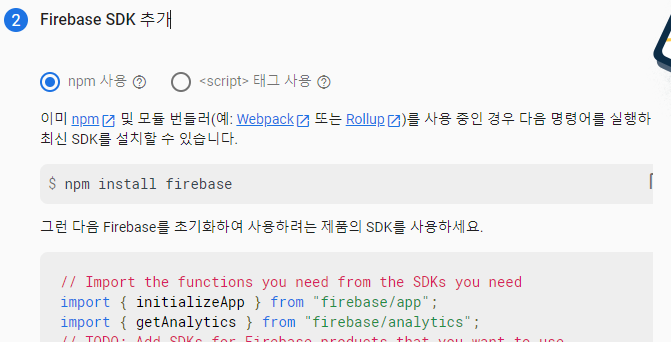
npm 사용, 생성된 javascript 코드를 보관한다.

local disk에서 app 생성
local disk에 project folder 생성
firebase 설치
npm install firebase
src/ 폴더를 만들고 src/index.js 파일을 생성한다.
console에서 생성해준 javascript 코드를 index.js에 붙여넣기 한다.
// Import the functions you need from the SDKs you need
import { initializeApp } from "firebase/app";
import { getAnalytics } from "firebase/analytics";
// TODO: Add SDKs for Firebase products that you want to use
// https://firebase.google.com/docs/web/setup#available-libraries

// Your web app's Firebase configuration
// For Firebase JS SDK v7.20.0 and later, measurementId is optional
const firebaseConfig = {
  apiKey: "AIzaSyBrrWCAOShJnEZ8TVzbi_jtdwzosJWcSzM",
  authDomain: "vocabook-asoe72.firebaseapp.com",
  databaseURL: "https://vocabook-asoe72-default-rtdb.firebaseio.com",
  projectId: "vocabook-asoe72",
  storageBucket: "vocabook-asoe72.appspot.com",
  messagingSenderId: "497956053018",
  appId: "1:497956053018:web:f95a9e49bee904cc0071a3",
  measurementId: "G-FYME07NW7P"
};

// Initialize Firebase
const app = initializeApp(firebaseConfig);
const analytics = getAnalytics(app);
webpack 설치, 실행
webpack을 개발용으로(-D) 설치
npm i webpack webpack-cli -Dwebpack 실행. (주의: Windows 환경이면 슬래시가 아닌 역슬래시임.)
npx webpack --entry ./src/index.js -o distentry와 output값이 default와 같으므로, 아래와 같이 생략해도 된다.
npx webpack이제 dist/main.js 파일이 생성되어 있다.
index.html
dist/index.html 파일을 생성하고, 아래와 같이 구현한다.
<!DOCTYPE html>
<html>
  <head>
    <meta charset="utf-8">
    <meta name="viewport" content="width=device-width, initial-scale=1">
    <title>Hello, World</title>
    <script src="/main.js"></script>
  </head>
  <body>
      hello
  </body>
</html>
firebase.json 파일을 아래와 같이 작성한다. (hosting/public에 entry folder를 dist 로 지정한 것에 주목할 것.)
{
  "database": {
    "rules": "database.rules.json"
  },
  "hosting": {
    "public": "dist",
    "ignore": [
      "firebase.json",
      "**/.*",
      "**/node_modules/**"
    ]
  },
  "emulators": {
    "hosting": {
      "port": 5000
    },
    "ui": {
      "enabled": true
    }
  }
}
프로젝트 선택
아래와 같은 명령문을 입력하면, 메뉴방식으로 project를 선택하게 된다. 선택 후, staging 이라고 입력한다.
C:\drv_D\git_repo\hr-alarms>firebase use --add
Debugger listening on ws://127.0.0.1:2013/dbd5ec03-713e-4de0-97e0-f6a22f16abe2
For help, see: https://nodejs.org/en/docs/inspector
Debugger attached.
? Which project do you want to add? myproject
? What alias do you want to use for this project? (e.g. staging) staging

Created alias staging for myproject.
Now using alias staging (myproject)
Waiting for the debugger to disconnect...
Hosting 시험
emulate locally:
firebase serveor
firebase serve --only hosting
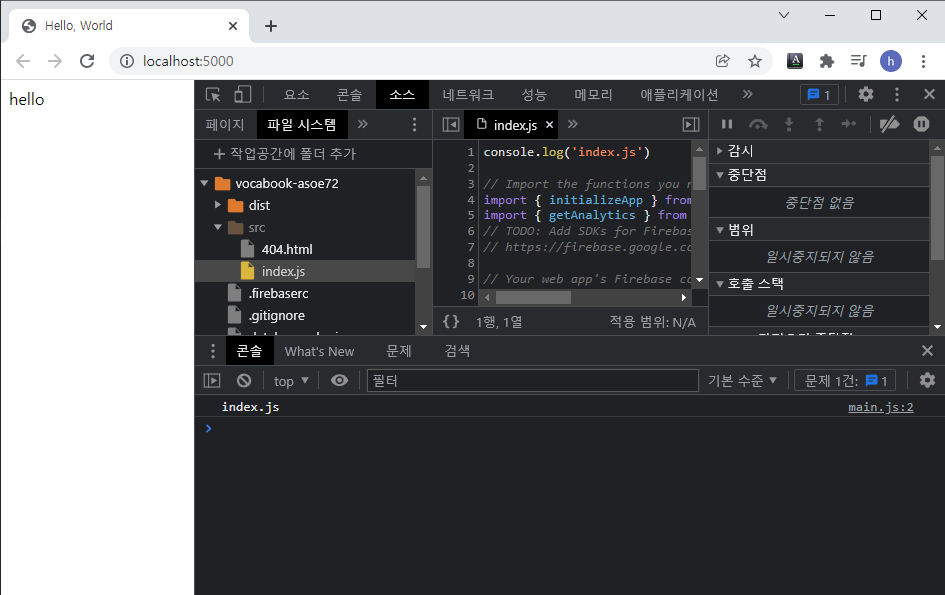
http://localhost:5000 link를 ctrl+좌클릭

F12를 눌렀을 때 에러가 없고 아래와 같이 잘 나오면 성공!!
실제 hosting deploy:
firebase deployor deploy 정보를 함께 기록
firebase deploy -m "Deploying the best new feature ever."
React serve나 deploy 시 component가 안 나올 때, 아래 참조.
My react project not working after deploy to firebase hosting
I'm following the instruction of this site and I'm already trying with an empty create-react-app project and It's working fine But when I'm trying with my existing project after deploy process was...
stackoverflow.com
'programming > db, web, node.js' 카테고리의 다른 글
| firebase webapp 개발 - 03. real-time database get, set (0) | 2021.12.25 |
|---|---|
| firebase webapp 개발 - 02. realtime-database 생성 (0) | 2021.12.25 |
| .docx 메뉴얼을 .html로 변경하는 법 (0) | 2021.03.14 |
| chrome 브라우저 full-screen으로 띄우기 (kiosk용) (0) | 2020.12.26 |
| angular (0) | 2020.12.25 |

